


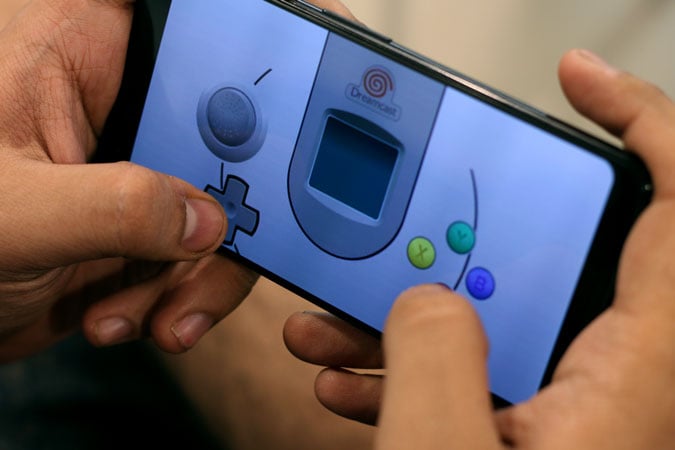
Embracing retro gaming on mobile devices has become increasingly popular, especially for fans eager to relive the golden days of the Sega Dreamcast. Thanks to advancements in emulation technology, it’s now possible to enjoy Dreamcast titles on your Android smartphone or tablet with remarkable accuracy and performance. This guide explores the most reliable Dreamcast emulators for Android, highlighting their features, ease of use, and compatibility to help you select the perfect option for your gaming needs.
1. Reicast (Free)
Reicast stands out as a straightforward and high-performing emulator suitable for both beginners and seasoned gamers. Setting it up is simple: you need to obtain a Dreamcast BIOS file and game ROMs, which can be compressed in ZIP, 7Z, or RAR formats. Once you place these files into the appropriate folders within your device’s storage, the emulator is ready to run.
For better gameplay, you can activate the frame rate counter to monitor performance and enable frame skip options if you experience lag or stuttering. Although Reicast does not offer as many advanced features as some paid alternatives, its free nature, quick performance, and intuitive interface make it an excellent choice for casual gaming.
2. Redream ($5.99)
Redream offers a premium experience with a one-time purchase that unlocks several valuable features. For just $5.99, users gain access to unlimited save states, allowing seamless gameplay resumption. The emulator supports high-resolution rendering up to 5K, ensuring crisp visuals, and includes Discord integration for multiplayer or community interactions.
Getting started with Redream involves selecting your local game folder or cloud storage like Google Drive, after which it automatically downloads cover art and game descriptions, making navigation effortless. With over 400 compatible titles, it accurately emulates Dreamcast peripherals such as the microphone and light guns, giving an authentic gaming experience. If you’re seeking a polished, feature-rich emulator, Redream is an outstanding choice.
3. Flycast (Free)
Flycast, based on the open-source NullDC project, boasts excellent compatibility and ongoing development. It can smoothly run over 500 titles, including Dreamcast and Saturn games like Grandia 2, and even emulates arcade hardware like Naomi through its RetroArch core integration.
Controlling and customizing your gaming experience is straightforward, with built-in profiles for popular gamepads, save states, cheat support, and options to increase rendering resolution to 2x for sharper visuals. To sync your progress across multiple devices, you can create a free Flycast Cloud account. As an open-source project, Flycast continues to improve, making it a dependable choice for both casual players and enthusiasts eager to explore the vast Dreamcast library.
4. Makaron (Free)
Makaron focuses on providing highly accurate emulation, prioritizing hardware fidelity over added enhancements. This makes it ideal for players seeking a near-arcade-perfect experience. It faithfully mimics Dreamcast hardware, ensuring most 2D fighting games and RPGs run smoothly. However, titles with more complex 3D graphics, such as Shenmue, may experience performance limitations.
Despite these constraints, Makaron excels at emulating arcade-style gameplay, especially in titles like Marvel vs. Capcom 2. It also supports save states, allowing for convenient progress management. Though it may not handle every game perfectly, it remains the top choice for fans wanting precise replication of classic arcade titles on their Android devices.
5. Mupen64Plus FZ (Free)
While primarily designed for Nintendo 64, Mupen64Plus FZ can also run certain arcade games from the Atomiswave platform, such as Dolphin Blue and Maximum Speed, which are closely related to Dreamcast titles. Atomiswave was essentially an arcade version of the Dreamcast, developed by Sammy, making this emulator a valuable tool for accessing exclusive arcade games that are otherwise lost.
In addition to Atomiswave titles, Mupen64Plus FZ supports Nintendo 64, PlayStation 1, and Game Boy Advance games, offering a versatile emulation platform. Setting up game controls is straightforward, and its extensive library covers many classic games from multiple generations.
Relive the Classics Today
Dreamcast emulators have opened new avenues for gaming enthusiasts to experience Sega’s final console on the go. Features like save states, graphics customization, and improved performance often surpass the experience of original hardware. Among these options, Redream delivers a premium, polished experience at a reasonable price, while free options like Reicast and Flycast provide excellent performance for casual players.
Their continual updates and expanding game compatibility ensure that both newcomers and veteran gamers can enjoy a broad spectrum of titles with ease. Whether you want to relive treasured memories or explore titles for the first time, these emulators make it possible to enjoy Dreamcast gaming anywhere.
Conclusion
Hopefully, this guide assists you in rediscovering classic Dreamcast titles on your Android device. Don’t forget to explore the different emulators’ features and choose one that best suits your gaming style. For those interested in game development, understanding the basics of how to start your own game dev studio can be helpful, and resources like this guide can provide valuable insights. Additionally, if you’re looking to expand your game library or connect with other developers, learning how to find the right team is essential—check out this resource. For more tips on managing and optimizing your gaming setup, exploring advanced networking strategies can also be beneficial, as detailed in this guide.