
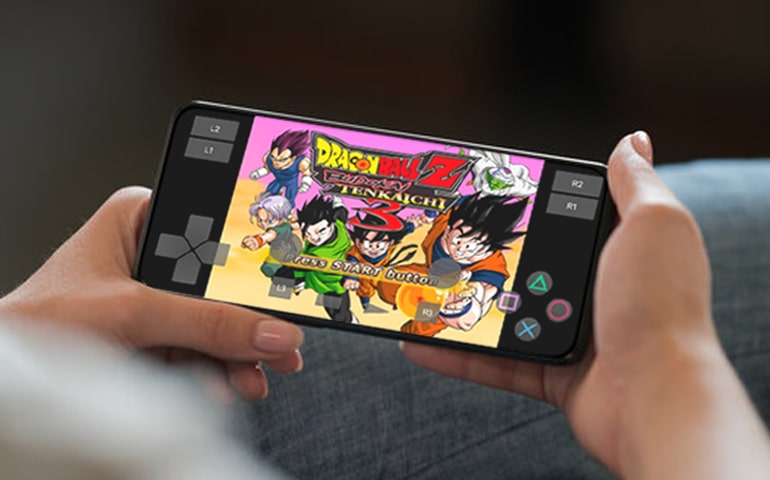
Playing classic PlayStation 1 (PS1) games on modern smartphones has become more accessible than ever, thanks to powerful emulators designed specifically for Android devices. Whether you’re nostalgic for titles like Final Fantasy VII or Metal Gear Solid, or eager to explore retro gaming, these tools allow you to experience the golden age of PlayStation gaming right on your mobile. In this comprehensive guide, we’ll explore the top PS1 emulators for Android in 2025, highlighting their features, pros, cons, and suitability to different types of users. Get ready to revive your childhood memories and enjoy timeless classics wherever you go.
—
What is a PS1 Emulator?
A PS1 emulator is a specialized Android application that mimics the original PlayStation hardware, enabling your device to run PS1 game files, commonly known as ROMs or ISOs. These emulators read the game data, emulate the console’s software environment, and render the graphics and audio just like the original hardware. This technology allows gamers to access a vast library of PlayStation classics, including titles like Tekken 3, Castlevania, and Final Fantasy 7, on their Android smartphones or tablets. However, it’s important to use legitimate game files and adhere to legal guidelines, as discussed in resources about getting in a game with a developer and starting your own game development studio.
—
Best PS1 Emulators for Android in 2025
1. DuckStation
Among the most popular choices, DuckStation is renowned for its high compatibility and impressive performance. Designed to emulate PS1 games with precision, it supports various file formats such as ISO, IMG, and BIN, making it flexible for different game backups. The interface is simple yet powerful, offering options to customize graphics, enable HD rendering, and utilize cheat codes. DuckStation also supports external controllers and save states, making gameplay seamless.
Initially, I encountered performance issues on low-end devices, but on modern phones like the Samsung S22 Ultra, DuckStation shines, delivering smooth gameplay even with demanding titles. Its support for hardware acceleration and dynamic recompilation ensures high fidelity visuals and fast response times.
Pros:
- Free to use
- Extensive compatibility
- HD rendering support
- Customizable video settings
- Save/load states
- External controller support
- Cheat code support
- Weekly updates
Cons:
- Requires relatively powerful hardware
- Setup can be challenging for beginners
- Occasional audio glitches
- Not all games are compatible
For more details, check out the official site and download DuckStation Emulator.
—
2. RetroArch
RetroArch is an all-in-one emulator that supports a multitude of gaming platforms, including PS1, NES, GBA, and more. Built on the Mednafen core, it offers high accuracy and extensive customization options. Its modular design means you can switch between cores for different consoles, making it a versatile choice for multi-platform gaming.
While the interface may seem complicated for newcomers, its flexibility and broad support make it a favorite among advanced users. Regular updates improve compatibility and performance, and the multiplayer features enhance social gaming experiences. To get the best results, ensure your device is sufficiently powerful to handle its settings and cores.
Pros:
- Free and open-source
- Supports numerous consoles
- High customization
- Supports multiplayer gaming
- Regular updates
Cons:
- Steep learning curve
- Not very beginner-friendly
- Demands a high-performance device
For more, explore the official RetroArch website.
—
3. ePSXe
ePSXe is celebrated for its exceptional compatibility and user-friendly interface. It works reliably across a wide range of Android devices, from budget phones to flagship models. Its speed, smooth graphics, and excellent controller support—covering PS4, PS5, DualShock, and Xbox controllers—make it a top pick.
Multiplayer support allows local or online co-op gaming, and the app’s stability ensures minimal lag or crashes. Although it’s a paid app, many users find its performance and features worth the investment.
Pros:
- Highly compatible
- Intuitive interface
- Supports multiplayer
- Regular updates
- Good controller support
Cons:
- Paid application
- Setup for controllers can be tricky
- Occasional audio sync issues
- Free version includes ads
Download ePSXe from the Google Play Store to start your nostalgic journey.
—
4. FPse
For enthusiasts seeking advanced graphics customization, FPse offers a near-authentic PlayStation experience. Its ability to upscale textures, improve graphics resolution, and emulate original sound quality makes it stand out. FPse supports various control schemes, including on-screen touch controls, external controllers, and keyboard input.
The app is regularly updated, ensuring stability and compatibility with a broad array of titles. Although it’s a paid app, its features justify the cost for dedicated retro gamers.
Pros:
- Authentic PlayStation feel
- High-quality graphics and sound
- Customizable controls
- Frequent updates
Cons:
- Paid app
- Slightly complex for beginners
- Not compatible with all games
- Demands a high-end device for optimal performance
—
5. Lemuroid
Launched in 2020, Lemuroid quickly gained recognition for its ease of use and broad compatibility. It supports ISO, BIN, and other image formats, allowing you to load your favorite PS1 titles without fuss. The emulator offers advanced settings for frame rate and resolution, along with save states and cheat code support.
Its open-source nature means frequent updates and community-driven improvements. However, users should be mindful of ads and occasional compatibility issues with some games. Nevertheless, for casual users seeking a straightforward experience, Lemuroid is a solid choice.
Pros:
- Simple and intuitive
- Good performance
- Save states and cheat support
- Open-source and free
Cons:
- Contains ads
- Compatibility limitations
- No multiplayer support
- Requires a relatively powerful device
Get it from the Google Play Store and start exploring.
—
6. Xebra
Xebra is known for its high accuracy and compatibility. It can precisely emulate PS1 games, offering an authentic gaming experience. Features like texture filtering and graphics upscaling allow you to enhance visuals beyond original capabilities.
While the user interface isn’t the most modern, the emulator’s stability and performance compensate for its simplicity. It supports external controllers and saves game progress efficiently.
Pros:
- Very compatible
- Excellent graphics upscaling
- Save states
- External controller support
Cons:
- Slightly complex setup
- Needs a powerful device for best performance
- Battery consumption can be high
- Slow update cycle
—
7. ClassicBoy Gold
This multi-system emulator supports PS1, GBA, NES, and SNES games, making it a versatile choice. Its customizable interface allows players to adjust controls and appearance, and it supports save states and cheats. Despite some performance inconsistencies on lower-end devices, it remains a favorite for multi-platform gamers.
Its ease of use and broad compatibility make it attractive for casual players. However, it is a paid app, and some features may drain device resources.
Pros:
- Supports multiple consoles
- Customizable controls
- Save states and cheats
- User-friendly
Cons:
- Paid app
- Performance issues on some devices
- No multiplayer mode
- Overheating risks on extended play
—
8. EmuBox
A newcomer with a modern interface, EmuBox supports PS1 and Nintendo emulation with ease. It boasts 20 save slots, screenshot capture, fast-forward, and external controller support, making it highly functional for enthusiasts.
It relies on your ROM files, and its simplicity is balanced by its powerful features. However, it’s not suitable for those wanting preloaded games, and heavy reliance on ROM legality applies.
Pros:
- Supports multiple systems
- Clean, material design
- Multiple save slots
- Controller support
- Fast-forward feature
Cons:
- Requires ROM files
- Slightly complex setup
- Limited community support
- Battery drain during intensive use
—
9. PS / PS2 / PSP Emulator (Libretro)
This all-in-one emulator based on the Libretro platform supports PS1, PS2, and PSP games. It’s free, highly customizable, and supports a broad range of titles. You need to supply your own ROMs, but it offers features like multi-disk management and optimized gameplay.
Ideal for multi-platform fans, it also supports other consoles like Atari and Nintendo. Its open-source nature ensures continuous improvement.
Pros:
- Free and open-source
- Supports multiple PlayStation systems
- Flexible controls
- Wide ROM support
Cons:
- Requires ROM files
- Performance varies
- No official dedicated support
—
10. Matsu PSX
Available in free (Lite) and paid versions, Matsu PSX is known for its high compatibility and good audio quality. It supports various file formats, including ISO, BIN, and ZIP, along with external controllers. Its 16 save slots and automatic save features add convenience.
However, the free version contains ads, which can be intrusive, and customization options are limited for beginners.
Pros:
- Good compatibility
- External controller support
- Multiple save slots
- Auto-saving
Cons:
- Ads in the free version
- Limited customization
- No support for ECM files
—
11. PS1 Emulator for Android (by Skymob)
Designed for straightforward use, this emulator offers customizable controls, rewind features, cheat codes, and external keyboard support. It’s compatible with a wide range of PS1 titles and provides enhanced graphics and audio.
While it may have a slight learning curve and includes ads, its broad compatibility makes it a solid choice for nostalgic gaming.
Pros:
- Customizable controls
- Good compatibility
- Enhanced graphics and sound
- External keyboard support
Cons:
- Ads
- Learning curve
- Performance variability
—
Final Thoughts
Choosing the best PS1 emulator depends on your device, gaming preferences, and technical comfort. For high compatibility and ease of use, ePSXe and DuckStation stand out. For multi-platform support and customization, RetroArch and EmuBox are excellent options. If you’re seeking a simple, free experience, Lemuroid and Matsu PSX are worth exploring.
Emulators like these unlock the door to your childhood memories, allowing you to enjoy timeless titles wherever you are. Remember to always use legally obtained game files, and explore resources on how to get in-game with developers or start your own game studio for a deeper dive into the gaming world.
Happy retro gaming!