
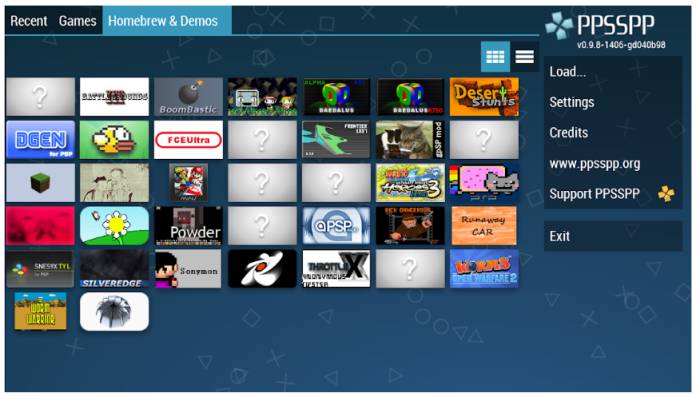
Embarking on the journey to enjoy PSP games on your Android phone or tablet is easier than ever with the right tools and knowledge. PPSSPP, a powerful PlayStation Portable emulator, allows gamers to relive classic titles and explore new ones directly on their mobile devices. This guide provides step-by-step instructions on how to download, set up, and play PPSSPP games, ensuring a smooth gaming experience. Whether you’re a seasoned gamer or a curious newcomer, understanding each stage—from emulator installation to game extraction—will help you maximize your PSP emulation on Android.
—
The Essential Steps to Download and Install PPSSPP Games on Android
Step 1: Download and Install the PPSSPP Emulator for Android
To start playing PSP games on your Android device, the first requirement is a reliable emulator. PPSSPP is widely regarded as one of the most efficient and user-friendly options available. It is compatible with most Android devices running Android Marshmallow (6.0) or newer, provided your device has at least 1GB of RAM for optimal performance.
PPSSPP comes in two main versions: a free edition that is ad-supported and a premium version called PPSSPP Gold, which is a paid app costing around $4.99 (roughly N1900). While the free version is perfectly capable of running most games, the Gold version offers an ad-free experience and additional features. You can download the official PPSSPP emulator from the Google Play Store or from the official website for the latest updates.
It’s important to support developers by purchasing the original app rather than using unofficial modded APKs, which could lead to security issues or outdated performance.
Step 2: Obtain the Best PPSSPP Games
Since the emulator itself does not include any games, you will need to acquire PSP game files in formats like `.ISO` or `.CSO`. These files are essentially digital copies of physical discs and must be extracted from compressed archives such as RAR or ZIP files before playing.
You can find a variety of games online, but always ensure you download from trusted sources to avoid malware. Popular titles include classics like “God of War: Ghost of Sparta,” “Assassin’s Creed Bloodlines,” and “Need for Speed: Most Wanted 5-1-0.” For legal reasons, only download games you own physically or are legally permitted to use.
To facilitate smooth extraction, you’ll need a file management app like ZArchiver, which allows you to decompress RAR and ZIP files efficiently. If you want to explore more games and their unlocking methods, check out variety how to unlock types in game dev story.
Step 3: Download ZArchiver for File Extraction
Most PSP game files are downloaded as compressed archives due to their large size. To convert these into playable formats, you’ll need to unzip them using a reliable app such as ZArchiver. This allows you to access the `.ISO` or `.CSO` files necessary for the emulator.
Download ZArchiver directly from the Google Play Store or from its official site. Once installed, open the app and locate your compressed game file. Tap on it and select ‘Extract’ to decompress the archive into your device’s storage. Make sure to extract the files into a dedicated PSP folder on your device to keep things organized.
Step 4: Extract the PSP Game Files and Prepare for Play
After unzipping, navigate to the extracted folder within ZArchiver. Look for the `.ISO` or `.CSO` files, which are the actual game images compatible with PPSSPP. If the extracted files are still in RAR or ZIP formats, repeat the extraction process on those specific files.
Move the final game files into a dedicated folder, such as “PSP Games,” on your device’s internal storage or SD card. An effective way to manage this is to create a clear directory structure, which simplifies navigating through your games later. For example, you might place the game in a path similar to `/storage/emulated/0/PSP/Games/`.
Step 5: Launch the PPSSPP Emulator and Play Your Games
Open the PPSSPP app and navigate to the folder where your game files are stored. You should see a list of available `.ISO` or `.CSO` files. Tap on the desired game to start playing. You can configure controls, graphics, and audio settings within the emulator to optimize performance and visual quality.
For a seamless experience, ensure your device’s screen resolution and performance settings are adjusted appropriately. Some games, like “God of War: Ghost of Sparta” or “Grand Theft Auto: Vice City Stories,” are notably demanding, so tweaking these settings can help avoid lag or crashes.
—
Top PPSSPP Games to Download and Play on Android
1. God of War: Ghost of Sparta
This title is arguably the most popular action game for PSP emulation, renowned for its stunning graphics and engaging storyline. Released in 2010 by Santa Monica Studio and published by Sony, it offers a cinematic experience full of intense combat and exploration. The game originally debuted on PS2 but gained immense popularity on PSP. You can find the game file in around 1122MB size. Play this masterpiece to relive the legend of Kratos on your Android device.
2. Assassin’s Creed Bloodlines
An essential entry for fans of the Assassin’s Creed franchise, this action-adventure game immerses players in a historical narrative set in the early days of the Assassin-Templar conflict. Developed by Ubisoft Montreal, it features excellent graphics and compelling gameplay. The file size is approximately 518MB, making it manageable for most devices. Explore the Assassin’s world through your PSP emulator.
3. Dragon Ball Z: Shin Budokai
Experience high-octane battles with this fighting game that brings the Dragon Ball universe to life. It includes multiplayer modes, numerous characters, transformations, and an engaging story mode. With about 197MB, it’s a compact yet action-packed option for fighting game enthusiasts. Challenge friends or AI in your PSP emulator.
4. Naruto: Ultimate Ninja Heroes
This game offers team-based combat where you can assemble and customize ninja squads. Featuring 20 playable characters and multiplayer options, it’s perfect for Naruto fans seeking competitive gameplay. The download size is approximately 204MB, and it provides hours of fun both solo and multiplayer.
5. Need for Speed: Most Wanted 5-1-0
A thrilling street racing game that combines high-speed chases with car tuning and customization. Race through an open-world environment, evade police, and compete against elite drivers. The game size is roughly 169MB, with dynamic gameplay that keeps players hooked.
6. Tekken 6
The legendary fighting tournament comes to PSP with a diverse roster and robust combat mechanics. Featuring innovative customization options and multiplayer battles, Tekken 6 is a must-have for fighting game lovers. The size is around 729MB, but the adrenaline rush makes it worthwhile.
7. Killzone: Liberation
This third-person shooter emphasizes multiplayer gameplay, allowing up to eight players to compete online. While its single-player mode is challenging, multiplayer battles are highly engaging. The game requires about 487MB of storage.
8. Grand Theft Auto: Liberty City Stories
A full-fledged GTA experience on your mobile device, featuring an open-world environment, engaging missions, and voiced characters. The game size is approximately 555MB, providing hours of criminal escapades.
9. Grand Theft Auto – Vice City Stories
Set in the Vice City universe, this game offers familiar locations with new missions and gameplay twists. Its open-world design and graphics make it a standout for PSP emulation, with a file size of about 866MB.
10. Prince of Persia: The Forgotten Sands
An adventurous platformer set in a mystical desert kingdom. The game challenges players with puzzles, combat, and exploration, and is approximately 499MB in size. Embark on this epic journey to restore balance and face new enemies.
For more options, explore variety how to unlock types in game dev story, which offers tips on unlocking hidden features in PSP games.
—
Final Words
This guide covers everything necessary to enjoy PSP classics on your Android device using PPSSPP. From installing the emulator to extracting and playing your favorite titles, each step is designed for ease and clarity. Remember to support game developers by purchasing original copies when possible and always use trusted sources for downloads. With patience and the right setup, you can relive the glory days of PSP gaming anywhere, anytime.
If you encounter issues or want additional tips, leave a comment below. Also, check out our previous posts on the best PPSSPP games to enhance your gaming library further. Happy gaming!
—