


Navigating Steam can sometimes be overwhelming due to its vast features and options. Whether you’re a seasoned gamer or just starting out, mastering some key tips and tricks can significantly improve your efficiency, security, and overall enjoyment. From managing your library more effectively to optimizing downloads and safeguarding your account, this guide covers the most valuable strategies to get the most out of Steam.
How to Add Non-Steam Games to Your Library
One of Steam’s most versatile features is the ability to integrate non-Steam titles into your library, allowing for centralized access and management. To do this:
- Click on the Add a game button located at the bottom left of the Steam client interface, then select Add a Non-Steam Game.
- A list of installed programs will appear—browse through to find your game, or click Browse to locate the game’s executable (.exe) file directly.
- Once selected, the game will appear in your library, enabling you to launch it seamlessly alongside your Steam titles.
This feature is particularly useful for managing emulators, indie games, or any software not officially available on Steam. For more advanced game management, consider exploring how to unlock different game types through variety in game development.
Organize and Conceal Your Games for a Cleaner Library
With an extensive collection, your Steam library can become cluttered. Creating categories helps you keep things tidy and quickly find the titles you want.
- Right-click on a game or select multiple titles, then choose Set Categories.
- You can create new categories like “Favorites,” “Multiplayer,” or “Completed,” and assign games accordingly.
- To hide certain titles from your main view, simply check the Hide this game in the library option. Hidden games won’t appear unless you choose to view hidden titles, making your library more manageable.
Proper organization enhances your gaming workflow, especially when juggling multiple game versions or genres.
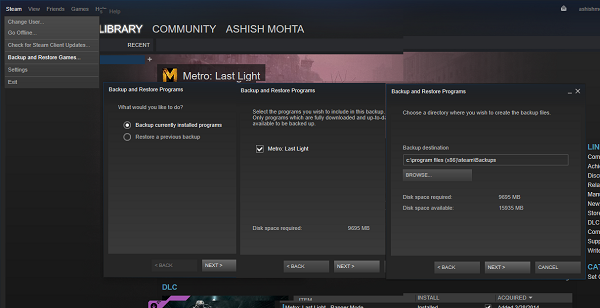
Back Up and Restore Your Steam Games
Protect your investment by backing up your game library. This process saves your game data and reduces re-downloading time in case of reinstallation or system failure.
- Open your Library, select the game(s), then click Backup Games or navigate via Steam > Backup/Restore.
- Choose a destination folder for the backup files—preferably on an external drive or cloud storage.
- Remember, Steam backs up only the current, downloaded, and updated versions of your games.
- Restoring is straightforward: select Restore Backup and point Steam to the backup folder, then follow the prompts.
Regular backups are essential for safeguarding progress and ensuring quick recovery.
Secure Your Account with Steam Guard
If you have invested heavily in your Steam collection, enabling Steam Guard is a wise security step. It helps prevent unauthorized access and potential theft of your digital assets.
- Head to Settings > Account > Manage Steam Guard Account Security.
- You can activate two-factor authentication via the Steam app or receive email codes.
- This added layer of security ensures that only you can access or make changes to your account, especially important if you frequently trade or sell games.
For comprehensive account security, consider linking your Steam account with other verified devices and following official security guidelines.
Share Your Library with Family Members
Steam provides a built-in family sharing feature that allows multiple users to access your library without sharing account credentials.
- Go to Settings > Family.
- Use Manage Family View to set restrictions or PIN locks, controlling what younger players can access.
- Enable Family Library Sharing to allow other users on the same PC to play your games. Once shared, they can download and play titles from your library independently when you’re not using the computer.
This feature is ideal for households with multiple gamers, offering convenience and control.
Maximize Your Shopping and Discovery with Enhanced Steam
Enhance your browsing experience with the Enhanced Steam browser extension, which provides valuable insights and discounts as you shop.
- It highlights games you already own, shows savings on bundles, and tracks your spending over time.
- The extension also displays owned DLC directly on game pages and offers personalized recommendations based on your wishlist.
- Download it from enhancedsteam.com, and unlock smarter shopping on Steam.
This tool helps you discover deals and manage your library more efficiently.
Remotely Download and Install Games
Don’t wait for your downloads to finish—initiate game installs remotely from anywhere.
- Log into your Steam account on another PC or via the Steam mobile app.
- Navigate to your Games list, then select the game you want to install.
- Click Install to start downloading remotely, even if you’re away from your main gaming PC.
This feature is particularly useful for preloading upcoming releases or updating your library without being physically present at your gaming setup.
Fine-Tune Your Download Settings for Better Performance
Optimizing how Steam handles downloads can save time and prevent network congestion.
- Access Steam > Settings > Downloads.
- Set up Download Folders to distribute your games across multiple drives, which helps if your main storage is full.
- Adjust Download Restrictions to limit speed during certain hours or to throttle bandwidth for other internet activities.
- To avoid interruption during gameplay, enable Allow download during gameplay under the same settings. You can also set per-game preferences by right-clicking a game, selecting Properties > Updates, and choosing Background downloads options.
If your Steam downloads are consistently slow, optimizing these settings can significantly improve your download speeds.
Keep Your Graphics Drivers Up to Date
While Steam doesn’t automatically update drivers, it can assist in checking for the latest graphics card updates, ensuring optimal performance.
- Navigate to Steam > Check for Video driver updates (note: this feature may have been removed in recent versions).
- Regular driver updates improve game stability, compatibility, and graphics quality. For the latest updates, visiting your GPU manufacturer’s official website (like NVIDIA or AMD) is recommended.
Regularly updating your drivers, combined with Steam’s own troubleshooting tips, keeps your gaming experience smooth and immersive.
—
Implementing these strategies ensures a more secure, organized, and efficient gaming setup on Steam. Whether managing your library, securing your account, or optimizing downloads, these tips help you get the most out of your gaming adventures.